The first edition covers marketing and runs inside an Acrobat PDF Space, with Adobe Express templates attached to each step. Adobe also said Express is now a LinkedIn connected app.
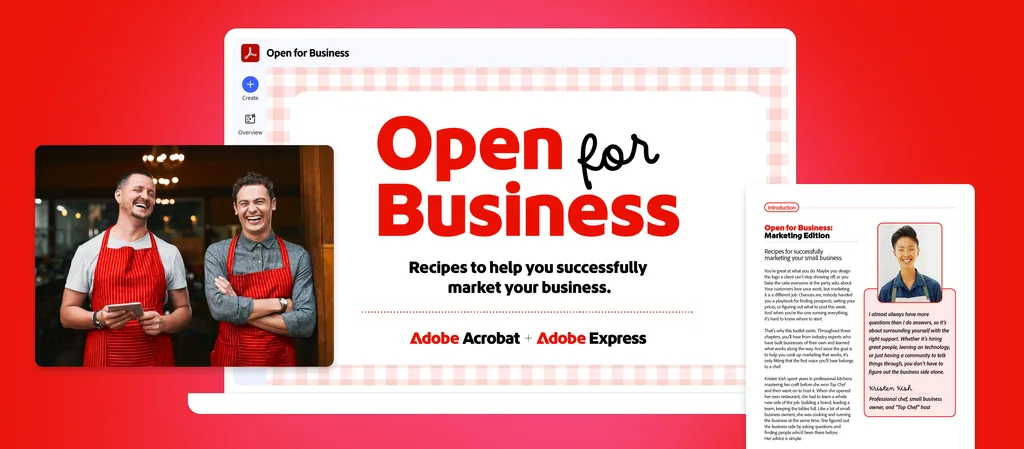
Adobe has released Open for Business: Marketing Edition, the first installment in a new toolkit series for small business owners, solopreneurs and entrepreneurs. The company announced it in a November 10 blog post, the opening day of Adobe MAX, and is now promoting it ahead of Small Business Saturday on November 28.
The toolkit pairs step-by-step workflows and ready-made templates in Adobe Acrobat and Adobe Express with advice from people who have built businesses of their own. Kristen Kish, the “Top Chef” winner and host who owns the Austin restaurant Arlo Grey, is Adobe’s launch partner for the edition. Daymond John, founder of FUBU and an investor on “Shark Tank,” and Chris Do, the Emmy-winning director and designer who founded The Futur, also contribute, along with a group of marketing strategists and Adobe Global Ambassadors.
The announcement post is by Govind Balakrishnan, whom Adobe has identified in past releases as senior vice president and general manager of Adobe Express. He opens with a Gallup figure: 62% of U.S. adults say they would prefer to be their own boss. That number comes from the Shopify-Gallup Entrepreneurship study, which surveyed nearly 47,000 adults in May 2024. Balakrishnan’s point is that most people who strike out on their own have little background in marketing, and the toolkit is meant to cover that gap.
For enterprise marketing leaders, the toolkit is a small-business product, but it shows two things worth tracking. Adobe is packaging how-to content inside its own AI document workspace, so the guide doubles as a demonstration of Acrobat’s PDF Spaces. And the LinkedIn integration puts a usage-based signal about Adobe Express on member profiles, which bears on how vendors, freelancers and candidates present their skills.
What the toolkit covers
The edition has four chapters, which Adobe says follow the sequence of winning and keeping a customer. Each chapter names the expert voices it features and produces a set of reusable assets.
Chapter One, on building a marketing foundation, walks readers through a brand kit, an outreach one-pager and a capabilities sheet that lays out services and pricing. Chris Do and Niki Hutchison, a marketing strategist and Adobe Global Ambassador, provide the advice.
Chapter Two covers winning new customers, with a custom pitch deck, a proposal and agreement, and a welcome kit for new clients. Daymond John appears here alongside Taylor Loren, a brand marketing strategist and former marketing leader at Girlboss and Later, and Taylor Smith, an Adobe Global Ambassador who founded The Power Table, a community for women entrepreneurs.
Chapter Three turns finished projects into a one-page case study, a longer case study and a portfolio webpage. Jack Appleby, the social media strategist behind the Future Social newsletter, and Katrina Owens, a personal branding and PR strategist, are the featured voices.
Chapter Four focuses on distribution. Readers build a content library, a social campaign kit and a content calendar, with advice from Appleby, social media coach Jera Foster-Fell and Hannah Isted, founder of HI Communications.
A template library collects the Express templates in one place. It includes a brand style sheet, the pitch deck and proposal templates, and social formats for Instagram, YouTube, TikTok, Facebook and LinkedIn, plus a business card template.
Built as a product walkthrough
The guide lives in a PDF Space, the AI-powered workspace in Acrobat that groups files and links so users can query them together. Readers can ask Acrobat’s AI Assistant questions about the toolkit and get answers with citations back to the source pages. They can also generate a podcast-style audio overview of a chapter, turn a chapter into a presentation or an interactive report, and share the Space with collaborators.
The workflows lean on the same features. To draft an outreach one-pager, the toolkit has readers upload past proposals, pitch emails and customer reviews to a PDF Space, then ask AI Assistant to identify the problems customers hired them to solve and to propose opening lines. The capabilities sheet follows the same pattern with invoices and service notes.
On the Express side, the toolkit describes setting up a brand kit by uploading a logo, a business card or a screenshot of a website, which Express uses to pull in logos, fonts, colors and creative guidelines. Users can then apply the kit to a multi-page template in one step. Content Scheduler handles planning and publishing to Instagram, Facebook, TikTok, LinkedIn, X and Pinterest, with an analytics view for reviewing results. The toolkit also points to Clip Maker for pulling short clips out of longer video.
Several of the features the toolkit relies on carry a beta label in Adobe’s own text, including AI Assistant in Express and Brand Check, which flags off-brand logos, colors or fonts in designs that AI Assistant helped create.
The expert advice
Kish’s contribution focuses on asking for help and trusting instinct. Adobe provided two quotes from her for editorial use. The first opens the toolkit:
“I almost always have more questions than I do answers, so it’s about surrounding yourself with the right support. Whether it’s hiring great people, leaning on technology, or just having a community to talk things through, you don’t have to figure out the business side alone.”
The second appears as a sidebar in the introduction:
“You can take advice, use tools, and follow a plan to a T, but at the end of the day, don’t forget about your intuition. Anyone can follow a recipe, but your personal tastes and instincts are what give the work its story and soul. The difference isn’t how something looks on paper—it’s how it feels. Figuring out what is genuinely you and sticking to that feeling is your superpower, because that’s the thing that makes you special.”
The other contributors offer more tactical guidance. Do advises raising a likely fee range in the first meeting with a prospect, once the scope is clear, so the proposal is not the first time the client hears a number. He also argues that brand perception depends on presentation choices such as copywriting and photography. John’s advice on pitch decks is to keep them lean and visual, state the problem and the outcome plainly, and cut any slide that does not move the deal forward.
The toolkit carries a disclaimer that it is general information and not legal advice, and it recommends consulting an attorney on contracts and agreements.
Adobe Express joins LinkedIn connected apps
Adobe used the same post to say that Adobe Express is now a LinkedIn connected app. When a member creates regularly in Express, their LinkedIn profile will reflect that, based on actual use.
LinkedIn introduced connected apps on June 17. Members link tools they use to their profile, and each app generates a short description of how the member uses it, drawn from activity in the app. Members cannot edit those statements, which update as usage changes, and heavy users can receive a “Top User” signal. LinkedIn named Descript, Duolingo, Lovable, Relay.app and Replit as its early partners and said more than a million members had connected apps. Adobe Express was not part of that initial group.
Adobe frames the integration around founders, whose LinkedIn profiles are often where partners and hires first look them up. The post does not say whether the connection is available for Express accounts managed under business or enterprise plans, or what usage data Express shares with LinkedIn to generate the profile statement.
What marketing leaders should weigh
Access terms are not spelled out. Adobe’s post links to Acrobat and Express plan and pricing pages but does not say whether the toolkit itself is free or which plan tier the AI Assistant workflows require. Most of the Acrobat steps depend on PDF Spaces and AI Assistant, and the post does not say which plans include them.
The guide is also a product guide. The marketing advice is general and broadly applicable, but every workflow runs through Acrobat and Express. Readers who use other design or document tools can take the advice and skip the steps.
For marketing teams that sell to small businesses, the format may be the more useful takeaway. Adobe has combined recognizable names, practitioner advice and working templates in a single shareable workspace that also shows off the product. It is a model that B2B marketers with an SMB audience may want to compare against their own resource libraries and onboarding content.
The LinkedIn integration raises a different set of questions. Usage-based profile statements could make it easier for marketing leaders to verify tool experience when they hire freelancers or agencies. They also turn product usage into a public signal, so organizations with policies on what employees disclose about internal tooling may want to see how the connection works before staff enable it.
Adobe calls Open for Business a series and describes this as its first edition. It has not said what the next edition will cover or when it will arrive.