New interactive editors for images, designs and PDFs let users switch between prompting and direct editing inside ChatGPT, with the conversation and the editor sharing context.
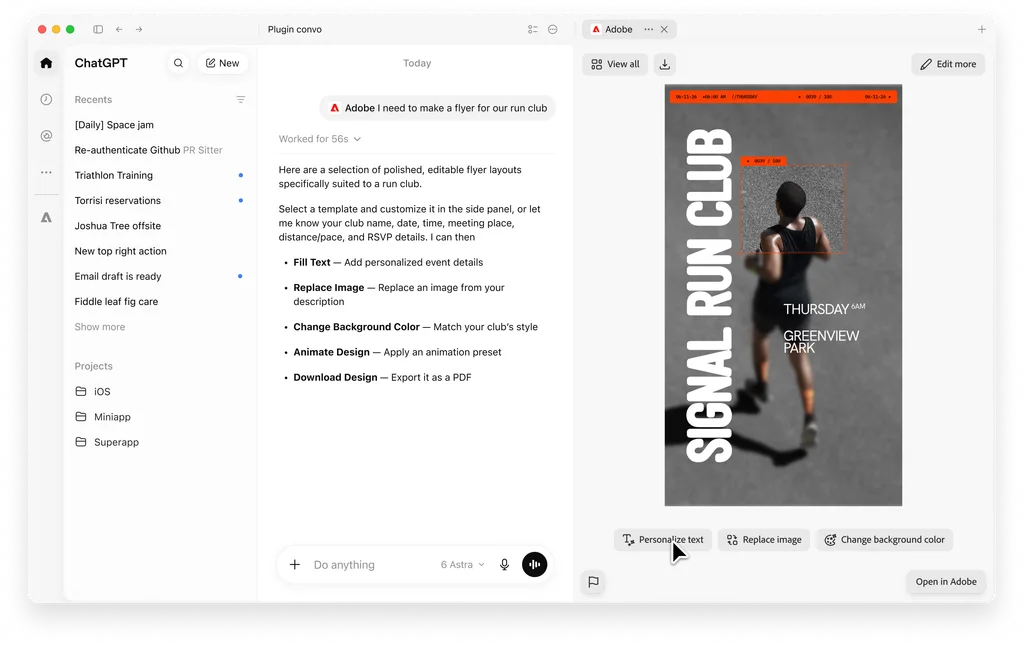
Adobe is adding interactive editors to the Adobe plugin in ChatGPT, giving users direct controls for adjusting images, designs and PDFs alongside the conversational editing the plugin already supports. The company announced the update on September 29 in conjunction with OpenAI’s DevDay 2026. The updates begin rolling out globally today on ChatGPT web and the ChatGPT app.
The editors open in a side panel within ChatGPT. The image and design editors are powered by Photoshop and Adobe Express, and the PDF editor uses the Acrobat tools included in the plugin. A user can describe an edit in the chat, then adjust the result by hand in the panel. Changes made in the editor are passed back to the conversation as context, so the user does not need to re-upload a file or re-describe earlier work before asking for the next change.
For marketing teams already using generative tools, the update targets a familiar problem. A prompt can get an asset most of the way to finished, but the final adjustments, such as brightening one product or toning down one color, are often easier to make by hand than to describe in words. Adobe’s approach keeps both options in the same place.
Editing images and designs
In the image and design editor, users select an object or brush over an area of an image, then ask ChatGPT to use the Adobe plugin to make a change. Based on the request, the editor surfaces controls relevant to that edit and scoped to the selection. Adobe cites sliders for hue, saturation, contrast and brightness as examples. If a user asks to change the color of an object, for instance, the editor presents color controls that apply only to that object.
Adobe’s own example is a social media lifestyle shot of a latte on a coffee table. The user brushes over a stray napkin and asks for it to be removed. The user then selects the cup, asks for a brightness and contrast adjustment, and fine-tunes both with the sliders Adobe surfaces. The image stays open throughout, and each step builds on the previous one.
Editing PDFs and sending document context to the chat
The PDF editor lets users revise text directly in a document and highlight passages without moving to a separate application. Selections made in the document can also be sent to ChatGPT to guide the next request.
Adobe’s example involves reviewing a contract. A user highlights a paragraph on payment terms and asks the plugin to find other sections dealing with payments or invoicing. Acrobat’s highlight tool marks those passages in the document so the user can review them together and check them for consistency. The same pattern applies to other long documents marketing teams handle regularly, including agency agreements, creative briefs and partner co-marketing terms.
OpenAI’s view
Vibhor Chhabra, product lead for ChatGPT Ecosystem at OpenAI, said the company wants ChatGPT to help users get from an idea to finished work “with control over the details along the way.” He said the Adobe plugin supports that by letting users move between describing what they want and editing the content themselves.
Part of a rapid multi-platform rollout
The ChatGPT update is the latest in a series of Adobe announcements placing its tools inside third-party AI assistants over roughly two months.
Adobe launched a unified plugin in ChatGPT on August 6, bringing together more than 70 tools from Photoshop, Firefly, Adobe Express, Premiere, Acrobat, Lightroom, Illustrator, InDesign and Adobe Stock. Adobe for Slack followed on September 2 for Slack Business+ and Enterprise+ customers. On September 24, Adobe launched Adobe in Gemini, with tools from Photoshop, Lightroom, Express and Firefly available across all Gemini plans, and expanded its Claude plugin to more than 80 tools with the addition of Acrobat. Adobe tools are also available in Microsoft Copilot.
The September 24 Claude update introduced interactive editors of its own, including a PDF editor and a layer-based editor for Express designs, along with a Document Review skill for analyzing and annotating documents. Today’s ChatGPT release brings a comparable editing model to ChatGPT, with a Photoshop-powered image editor that surfaces controls dynamically based on the request. The specific editors and skills available currently differ by platform, and Adobe has described each release as part of an ongoing effort that it intends to keep expanding.
Adobe continues to position its flagship desktop and web applications as the destination for work that needs more depth. The in-chat tools are designed for quick creation, adjustment and document handling, with the option to move into full applications when a project calls for it.
What it means for enterprise marketing leaders
Last-mile edits move closer to where requests start. Many small asset changes in a marketing organization, such as resizing, cleanup and color correction, do not require a designer’s full toolset. Hands-on controls inside ChatGPT make it more practical for marketers outside the creative team to finish these edits themselves once a generated or supplied image is close.
Wider access raises brand governance questions. As more employees can edit brand imagery directly in a general-purpose assistant, marketing leaders may want to review how brand standards, approved asset libraries and review steps apply to edits made outside established creative workflows.
Document review becomes part of the same workspace. The PDF editor’s ability to pass selected text into a chat request supports common marketing operations tasks like contract and brief review. Organizations will want to confirm how their existing policies on uploading documents to AI assistants apply here, particularly for agreements containing commercial terms.
Capabilities vary by assistant. Companies that have standardized on one AI assistant should check which Adobe features are available on that platform, since editors, skills and tool counts are not currently identical across ChatGPT, Claude, Gemini, Slack and Copilot.
Enterprise availability is worth confirming. Adobe’s announcement specifies ChatGPT web and the ChatGPT app. It does not say whether the interactive editors extend to ChatGPT’s business and enterprise workspaces, or whether they require an Adobe sign-in. Teams planning a rollout may want to ask Adobe directly.
The updates to the Adobe plugin in ChatGPT are rolling out globally starting today.