
Adobe for Slack lets marketing teams generate and edit content from inside the channels where campaign work already happens, using project context Slack has already captured.
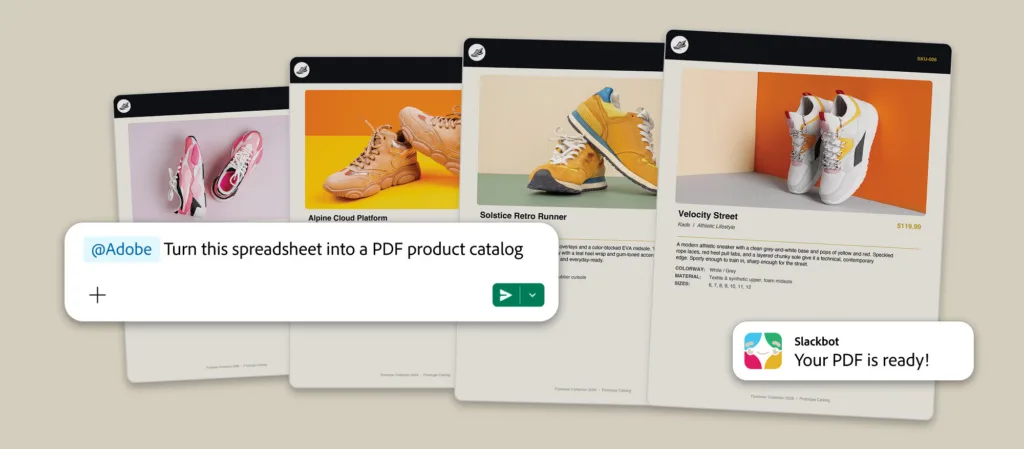
Adobe is launching Adobe for Slack, an MCP app that puts more than 70 tools from its creative and productivity suites — including Firefly, Adobe Express, Photoshop, Premiere, Acrobat, InDesign, Illustrator, Stock and Lightroom — directly inside Slack. The app is available globally to Slack Business+ and Enterprise+ customers across desktop, web and mobile.
The pitch for enterprise marketing teams is less about the tool count than about where the work sits. Much of the context behind a given deliverable already lives in Slack: the brief in a Canvas, rounds of feedback across channel threads, the reference file a colleague shared last week. Adobe for Slack lets teams point Slackbot, Slack’s built-in AI assistant, at that material and hand it to Adobe’s tools to produce images, video, designs and PDFs without leaving the conversation.
Users install the Adobe app, describe the outcome they want in their own words to Slackbot, and Slackbot routes the request to the relevant Adobe tools. Slackbot can also pull in context from conversations, files, channels and Canvases for the Adobe app to work from.
“Slack is where work happens, and where AI is turning conversation into action,” said Jaime DeLanghe, Chief Product Officer at Slack. “Bringing Adobe’s industry-leading creative and productivity tools directly into that flow means teams don’t have to leave their conversations to create. Adobe for Slack lets people turn the context and ideas already in their conversations into incredible content, then refine and build on it together, without breaking their stride. The Adobe app is a powerful example of how MCP apps in Slack can help teams turn conversation into action.”
What marketing teams can do with it
Adobe outlined six workflows in its announcement, several of which map closely to recurring enterprise marketing bottlenecks:
- Turn project plans and conversations into content. Ask Slackbot to find and summarize information from a thread or Canvas, then call on the Adobe app to turn that context into PDFs, images and videos shared back into the channel.
- Put Creative Cloud assets to work. Search existing Creative Cloud assets by subject, style or mood to surface content from past projects or campaigns, then bring the right assets into the Slack workflow for further editing.
- Adapt campaign creative across channels. Take approved images and video and generate variations sized for different social platforms.
- Create designs from templates. Browse Adobe’s design templates, customize copy and colors, then animate the result for social or export it as a print-ready PDF.
- Turn data into shareable content. Bring in a spreadsheet and have the Adobe app convert it into a PDF or a visual for a team or client.
- Edit and refine images in bulk. Process sets of images — headshots, event photography, product shots — to remove backgrounds and distractions, adjust lighting and tone, and crop or resize, all from Slack.
Adobe positions the Slack app as the front end rather than the finish line. Work that needs pixel-level control or deeper document analysis can continue in Adobe Express, Photoshop, Premiere, Acrobat and Firefly.
Access and setup
Teams connect the app by opening a direct message with Slackbot, selecting Apps, choosing Manage Apps, and selecting the + icon next to Adobe. From there, users can continue as a guest or sign in with an Adobe account.
Notably, an Adobe account is not required to start using the app. Signing in with a free account unlocks additional tools and skills, generative AI capabilities, access to Creative Cloud files, and continuity across sessions — a detail worth noting for marketing organizations weighing how broadly to roll the app out beyond their licensed creative staff.
Part of a wider distribution strategy
Adobe for Slack extends an effort to place Adobe’s tools inside the AI platforms employees already use day to day. The company launched Adobe for ChatGPT on August 6, and its tools are also available in Claude and Copilot, with Gemini support described as coming soon.
The approach reflects a broader shift enterprise marketing leaders are tracking in their own stacks. As MCP becomes a common connective layer between AI assistants and specialized software, capabilities that once required opening a dedicated application can be called from wherever a team is already working. For Adobe, that means appearing in Slack, ChatGPT and other assistants rather than requiring a trip to a creative app to start the job.
Adobe for Slack is available now to Slack Business+ and Enterprise+ customers.