Two announcements extend Adobe’s reach across the AI assistants employees already use, and push the Claude plugin past 80 tools by combining creative and document work in a single conversation.
Adobe is bringing its creative tools to Google Gemini for the first time and expanding its Claude plugin to include Acrobat, two moves that widen the set of AI assistants where marketing teams can call on Adobe’s software without opening a Creative Cloud app.
Both are rolling out globally beginning today.
In Gemini, users can call on tools from Photoshop, Lightroom, Adobe Express and Firefly to enhance photos, create marketing assets and customize designs through conversation. Adobe determines which tools to run and in what order, based on a described outcome rather than a specified sequence of steps.
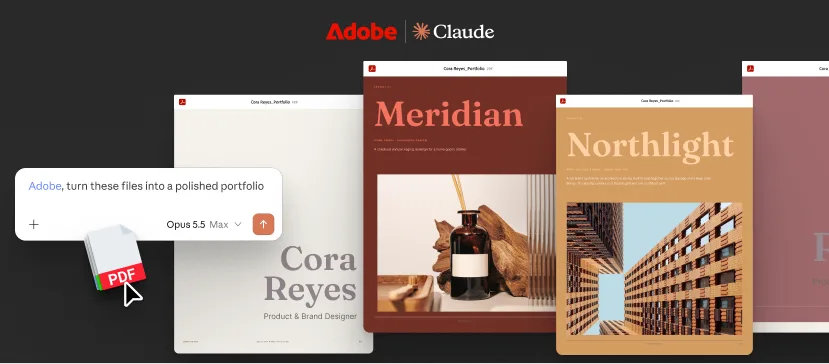
In Claude, Adobe is adding Acrobat tools to the plugin for the first time, bringing PDF work alongside the creative tools already available there. The combined plugin now spans more than 80 tools across Acrobat, Express, Photoshop, Illustrator, Premiere, Lightroom, InDesign and Adobe Stock. Adobe is also introducing interactive editors that let users work hands-on with a result rather than only describing what they want.
“At Adobe, we build pro-grade tools people trust to create their best work and be more productive,” wrote Deepti Pradeep, Senior Director, Agentic AI at Adobe, in the announcement. “Increasingly, that work is starting inside AI chatbot platforms, where people brainstorm ideas, solve problems and get things done. We want Adobe to be there too.”
Adobe in Gemini
The Gemini launch gives Adobe access to a user base it has not reached through its other assistant integrations. Google reported in August that the Gemini app had passed one billion monthly users, making it the company’s fastest-growing product.
Adobe outlined three initial use cases, each aimed at common marketing production work:
- Product photography at consistent quality. Upload product photos and describe the intended look. Adobe optimizes lighting and color, crops consistently, and prepares a set ready for a storefront, website or campaign materials.
- Channel adaptation from a single design. Ask for social-ready versions of an existing design while preserving branding and messaging.
- Template customization. Describe a campaign, audience and style, and Adobe surfaces matching Adobe Express templates, then personalizes text, imagery and colors.
“We’re excited to expand our partnership with Adobe and bring industry-leading creative tools directly into Gemini,” said Neal Pancholi, Managing Director, Global Partnerships, GDM & Gemini at Google. “Now, anyone can create, edit and bring their ideas to life right in the chat.”
Adobe describes the launch as a first step with Google and says it will add more creative and productivity tools to the Gemini experience over time, following the pattern it has used on other assistant platforms.
What’s new in Claude
The Claude update is the more substantial of the two for teams already working in that environment, because it changes what a single conversation can carry end to end.
Adobe first brought creative tools into Claude in April through the Adobe for creativity connector, which launched with more than 50 tools spanning image, vector, layout and video editing. Acrobat’s arrival adds the document side of the workflow.
Three changes stand out:
Acrobat tools in the plugin. Users can organize PDFs by deleting, combining or splitting pages, redact sensitive information, and convert or export PDFs to other formats.
An interactive PDF editor. For work that needs direct control, a PDF opens in a new editor where users can reorder pages, edit text, and mark up documents with comments and highlights. A new Document Review skill asks Claude to analyze a document and add recommendations and notations directly in the editor.
Layer-based editing for Express designs. Beyond the conversational editing already available, a layer-based editor gives hands-on control over individual design elements. Images, copy, colors and fonts can be selected and adjusted independently, so refining one element no longer requires regenerating the whole design.
That last point addresses a practical limitation of generative design workflows. Regenerating an entire asset to change a headline or swap a color introduces variance that brand teams then have to re-review. Element-level editing narrows the scope of each change and, by extension, the scope of each approval.
Adobe illustrates the combined workflow with a campaign example: prepare a set of product shots, assemble them into a catalog using Express, convert it to PDF, then use Acrobat tools to edit, organize and finalize the document, all within the same conversation.
Why it matters for enterprise marketing teams
The pattern across Adobe’s assistant integrations is consistent. Rather than asking teams to come to Creative Cloud, Adobe is placing its tools inside the platforms where work is already being discussed and planned. The company now has integrations live in ChatGPT, Claude, Slack, Copilot and Gemini.
For marketing organizations, three implications are worth tracking.
Creative and document production converge. Campaign work rarely stops at an image. It ends in a one-pager, a catalog, a pitch deck or a signed-off PDF. Acrobat and Express in the same plugin means those stages no longer require handoffs between tools or between people with different licenses.
Access extends beyond licensed creative staff. In Claude, users can start as a guest without an Adobe account, with sign-in unlocking higher usage limits, additional tools and continuity across sessions. Gemini’s setup requires an Adobe account, though a free one will do. Either way, the practical effect is that product marketers, field teams and partner managers can produce usable creative without occupying a seat on the creative team’s license.
That raises questions marketing operations leaders will want to answer before the capability spreads by word of mouth. Which brand assets are reachable from which assistant, who reviews output produced outside the established creative workflow, and how work created in a chat session gets back into the systems where approved assets live. Adobe’s materials do not address enterprise governance for these integrations, and the guest-access path in particular means adoption can precede policy.
Depth still lives in the apps. Adobe continues to position the assistant integrations as the starting point rather than the finish line, with flagship applications handling work that calls for greater precision. For teams evaluating where these tools fit, the useful framing is volume work and first drafts in the assistant, final control in the app.
Availability and setup
Adobe in Gemini is rolling out globally and is available across all Gemini plans. To connect it, users navigate to Personal Intelligence, select Adobe under Connected Apps, and sign in with an Adobe account or create one for free.
Adobe for Claude is rolling out globally across Claude and Code on desktop, mobile and web. Users can start as a guest or sign in with an Adobe account for the full plugin experience. Teams that already have the previous Adobe connector installed will see it update automatically to the new plugin.