
Animations generated in Anthropic’s Claude Motion can open directly in Adobe’s Firefly Video Editor for timeline editing, extending Adobe’s effort to make its tools reachable from the AI assistants where work increasingly starts.
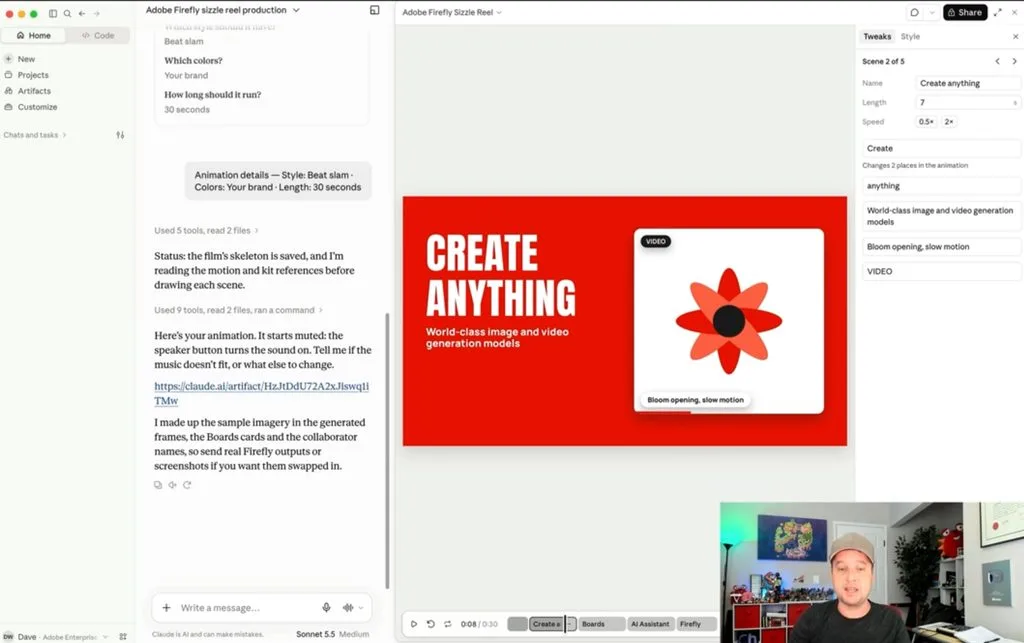
Adobe has detailed its role in Anthropic’s newly announced Claude Motion feature: a “Send to Adobe” option that takes an animation created in Claude and opens it in Firefly Video Editor, the timeline-based editor inside Adobe Firefly.
Claude Motion generates short, code-based animations from a prompt. According to Adobe, choosing “Send to Adobe” moves that animation into Firefly Video Editor, where users can cut and rearrange clips, adjust pacing, refine audio and color, add their own footage, and generate additional clips with AI models.
Deepti Pradeep, Senior Director, Agentic AI at Adobe, described the handoff in a LinkedIn post, noting that the editor’s layered timeline can be used to build on an animation with new scenes generated by models from Adobe, Google, Runway and Kling.
“Something that starts with a prompt in Claude can become the beginning of a richer creative workflow in Firefly,” Pradeep wrote.
Her post includes a demo video from Dave Werner that starts with a Claude Motion animation, sends it to Firefly Video Editor, and then uses the timeline to work with individual scenes, change the pacing, refine the audio and add new sounds.
What marketing teams should know before adopting it
For marketing organizations, the practical use case is short-form motion content such as social animations, explainer clips and campaign teasers, where a first version can be prompted in Claude and then finished with conventional editing controls.
A few details from Adobe’s own product documentation are relevant to rollout planning:
- The editor is still in beta. Adobe’s Firefly product page describes the timeline-based Firefly video editor as currently in beta and available only on desktop (macOS and Windows) in the Chrome browser, with other browsers not yet supporting all features.
- Generation draws on credits. Firefly offers a limited amount of free generation, with additional use tied to Creative Cloud or Firefly plans and generative credits.
- Commercial terms vary by model. Adobe states that its Firefly Video Model is trained on licensed and public domain content and is safe for commercial use, while noting that partner models may carry different usage terms. Teams generating new scenes with third-party models inside the editor will want to confirm which terms apply.
One of several ways Adobe now shows up in Claude
“Send to Adobe” sits alongside the Adobe for Claude plugin, which Adobe expanded on September 24. The plugin now offers more than 80 tools drawn from Acrobat, Adobe Express, Photoshop, Illustrator, Premiere, Lightroom, InDesign and Adobe Stock, up from the 50-plus tools in the connector Adobe launched in Claude in April.
The September update added Acrobat tools to the plugin for the first time, along with interactive editors that let users edit PDFs and customize Adobe Express designs inside a Claude conversation, in addition to prompting for an outcome.
Adobe says users can start as a guest, and that signing in with an Adobe account unlocks higher usage limits, additional tools and continuity across sessions. Its product FAQ adds that the plugin does not include every feature from each Adobe app, and that some tools require an eligible paid Adobe plan.
Part of a broader distribution push
The Claude Motion handoff follows a run of announcements placing Adobe’s tools inside third-party AI platforms:
- ChatGPT: Adobe for ChatGPT launched August 6. On September 29, alongside OpenAI’s DevDay, Adobe added interactive editing controls for images, designs and PDFs in ChatGPT side panels.
- Slack: Adobe for Slack launched September 2 for Business+ and Enterprise+ customers.
- Gemini: Adobe in Gemini began rolling out September 24 with tools from Photoshop, Lightroom, Express and Firefly. Adobe’s help documentation says it requires an Adobe account and currently supports English only.
Adobe has also said its tools are available in Microsoft Copilot.
Most of those integrations bring Adobe’s tools into the assistant. “Send to Adobe” works in the other direction: content created with an assistant’s own feature is passed out to an Adobe application for finishing. For marketing leaders mapping where AI-generated drafts end up, that gives Adobe a position at the refinement stage even when the first version is made elsewhere.
“You can start wherever your idea takes shape, then tap into the magic of Adobe to create, refine and bring it to life,” Pradeep wrote.